异常监控系统
异常类型
js 异常
-
try-catch
缺点:无法捕获异步错误
-
window.error
可捕获异步,信息全面
返回 true 就不会被上抛了。不然控制台中还会看到错误日志。
缺点:无法捕获网络请求错误
-
监听 error 事件
window.addEventListener('error',() => {}) -
Promise 错误
window.addEventListener("unhandledrejection", (e) => { throw e.reason; }); -
Async/await 错误
本质就是 Promise 监听 unhandledrejection 向上抛出错误即可
-
总结
我们可以将 unhandledrejection 事件抛出的异常再次抛出就可以统一通过 error 事件进行处理了。
window.addEventListener("unhandledrejection", (e) => {
  throw e.reason;
});
window.addEventListener(
  "error",
  (args) => {
    console.log("error event:", args);
    return true;
  },
  true
);
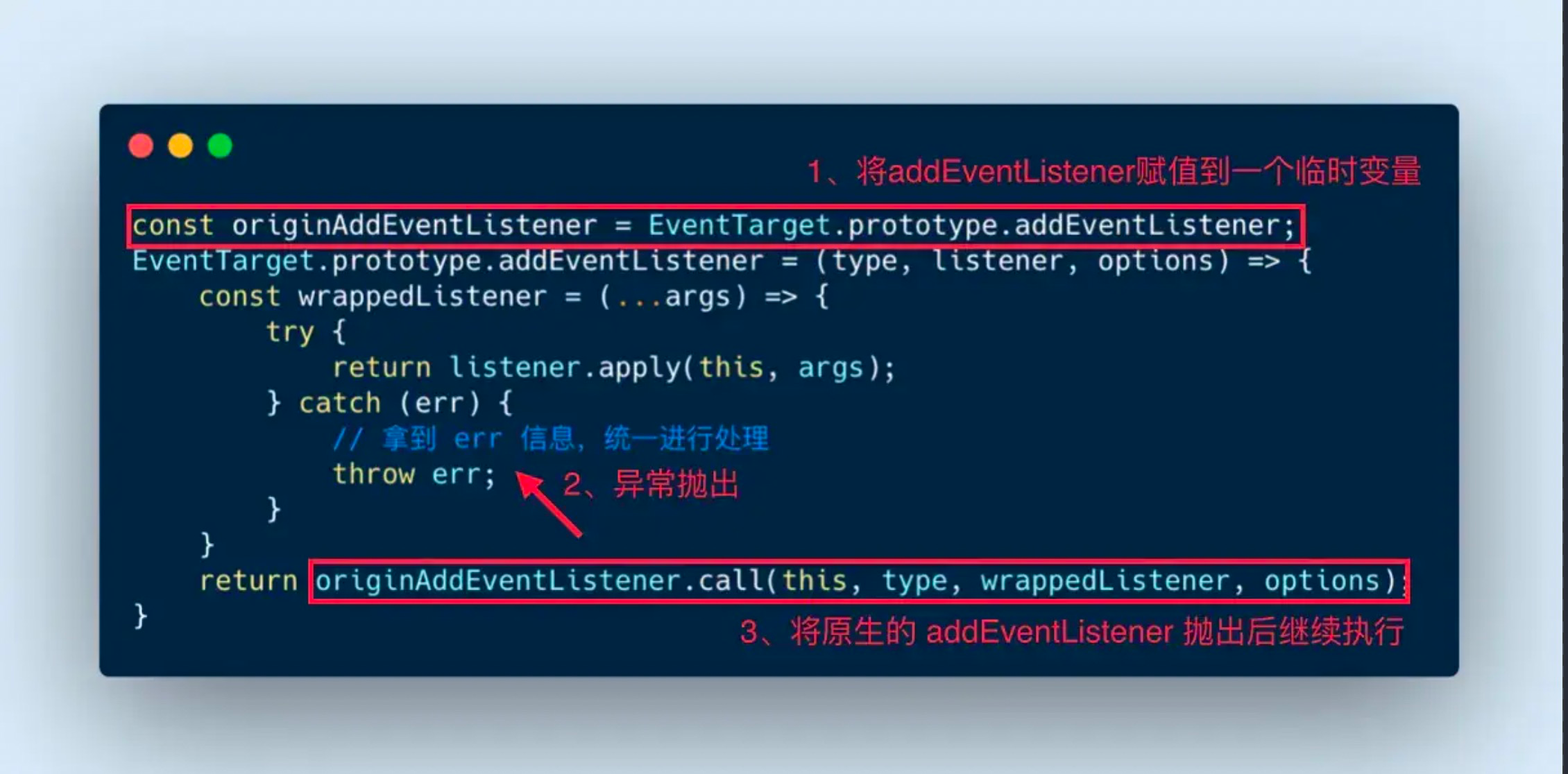
这是 AOP(面向切面编程)设计模式,当错误发生的时候,我们会在 catch 中重新 throw 一个错误出来,最后在将原生 addEventListener 抛出执行。
Vue
Vue.config.errorHandler = (err, vm, info) => {
  let { message, name, script = "", line = 0, column = 0, stack } = err;
  console.log("errorHandler:", err);
};
React
错误边界仅可以捕获其子组件的错误。错误边界无法捕获其自身的错误。如果一个错误边界无法渲染错误信息,则错误会向上冒泡至最接近的错误边界。
使用 componentDidCatch 进行错误捕获
import React from "react";
export default class ErrorBoundary extends React.Component {
  constructor(props) {
    super(props);
  }

  componentDidCatch(error, info) {
    // 发生异常时打印错误
    console.log("componentDidCatch", error);
  }

  render() {
    return this.props.children;
  }
}
环境信息收集
行为分类
用户行为
使用 addEventListener 全局监听点击事件,将用户行为(click、input)和 dom 元素名字收集。当错误发生将错误和行为一起上报。
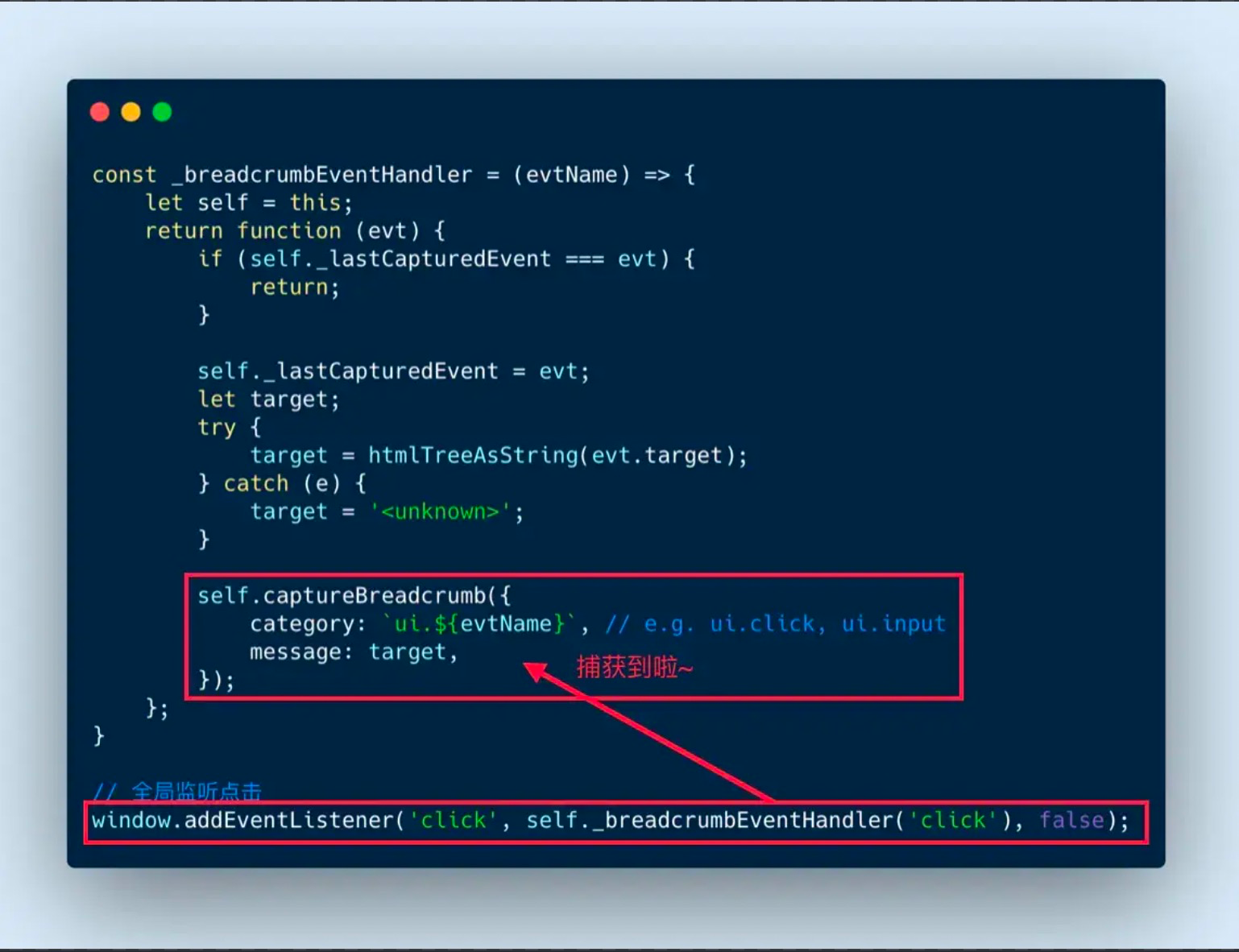
浏览器行为
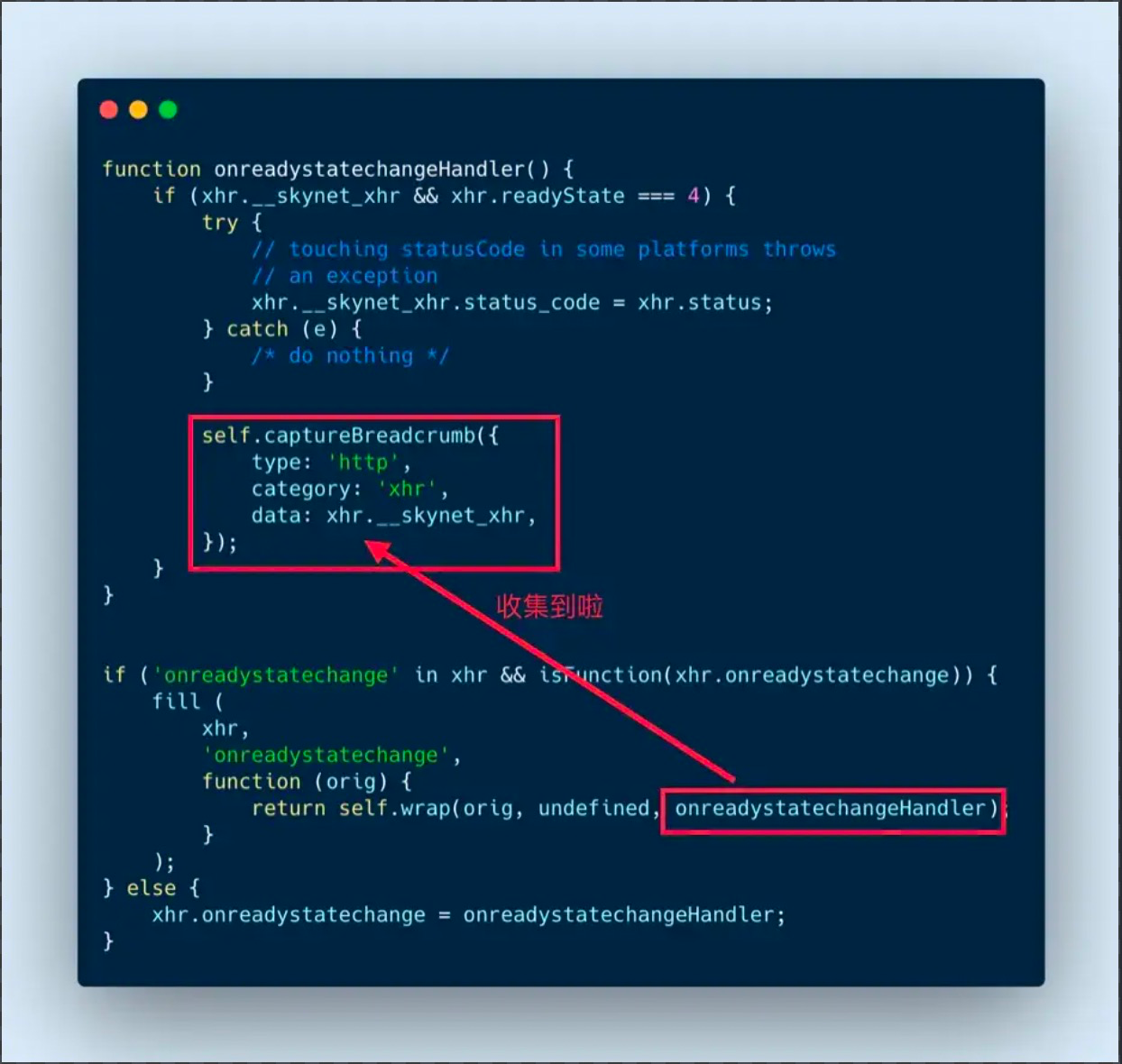
监听 XMLHttpRequest 对象的 onreadystatechange 回调函数,在回调函数执行时收集数据。
监听 window.onpopstate,页面跳转的时会触发此方法,将信息收集。
错误上报
img 上报
推荐使用 1*1 的 gif
原因是:
1、没有跨域问题
2、发 GET 请求之后不需要获取和处理数据、服务器也不需要发送数据
3、不会携带当前域名 cookie!
4、不会阻塞页面加载,影响用户的体验,只需 new Image 对象
5、相比于 BMP/PNG 体积最小,可以节约 41% / 35% 的网络资源小
new Image().src = "http://localhost:7001/monitor/error";ajax 上报
axios.post("http://localhost:7001/monitor/error");上报数据

// 分别是错误信息,错误地址,lineno,colno,error.message,error.stack// 将info信息序列化后上传
const str = window.btoa(JSON.stringify(info));
const host = "http://localhost:7001/monitor/error";
new Image().src = `${host}?info=${str}`;数据清洗去重
      except: [
        /^Script error\.?/,
        /^Javascript error: Script error\.? on line 0/,
      ], // 忽略某个错误
     repeat:5
// 重复出现的错误,只上报config.repeat次
    repeat(error) {
      const rowNum = error.rowNum || '';
      const colNum = error.colNum || '';
      const repeatName = error.msg + rowNum + colNum;
      this.repeatList[repeatName] = this.repeatList[repeatName]
        ? this.repeatList[repeatName] + 1
        : 1;
      return this.repeatList[repeatName] > this.config.repeat;
    }

    // 忽略错误
    except(error) {
      const oExcept = this.config.except;
      let result = false;
      let v = null;
      if (utils.typeDecide(oExcept, 'Array')) {
        for (let i = 0, len = oExcept.length; i < len; i++) {
          v = oExcept[i];
          if ((utils.typeDecide(v, 'RegExp') && v.test(error.msg))) {
            result = true;
            break;
          }
        }
      }
      return result;
    }
sourceMap 上传
let mapKeys = Object.keys(compilation.assets).filter(item => /.map$/.test(item.toLowerCase()))
let promiseList = []
for (let item in mapKeys) {
    promiseList.push(
        getClient(
            appKeys,
            appVersion,
            mapKeys[item].substr(mapKeys[item].lastIndexOf('/') + 1),
            compilation.assets[mapKeys[item]].source().toString()
        )
    )
}
Promise.all(promiseList)
插入 html
const HtmlWebpackPlugin = require('html-webpack-plugin')
const { type } = require('os')
const { resolve } = require('path')
const { compilation } = require('webpack')
class HtmlAddAttrPlugins {
    constructor(options = {}) {
        this.options = options
    }

    addAttr (tag, key, val) {
        if (!tag || !tag.length) return
        tag.forEach((tag, index) => {
            let value = val
            if (typeof val === 'function') {
                value = val(tag, compilation, index)
            }
            !tag.attributes && (tag.attributes = {})
            tag.attributes[key] = value
        })
    }
    apply (compiler) {
        let _self = this
        compiler.hooks.compilation.tap('htmlPlugin', compilation => {
            HtmlWebpackPlugin.getHooks(compilation).alterAssetTagGroup.tapAysnc('htmlPlugin',
                (data, cb) => {
                    let options = Object.assign({}, null, _self.options.attributes)
                    Object.keys(options).forEach((key) => {
                        let val = options[key]
                        if (typeof value != "string" && typeof value != 'function') return
                        _self.addAttr(data.headTags, key, value)
                        _self.addAttr(data.bodyTags, key, value)
                    })
                    if (typeof cb === 'function') {
                        cb(null, data)
                    } else {
                        return new Promise(resolve => resolve(data))
                    }
                })
        })
    }
}
异常收集
这里使用 egg 进行异常收集
将错误接收并转码写入到日志中
async index() {
    const { ctx } = this;
    const { info } = ctx.query
    const json = JSON.parse(Buffer.from(info, 'base64').toString('utf-8'))
    console.log('fronterror:', json)
    // 记入错误日志
    this.ctx.getLogger('frontendLogger').error(json)
    ctx.body = '';
  }
整理与上报方案
除了异常报错信息本身,我们还需要记录用户操作日志,以实现场景复原。这就涉及到上报的量和频率问题。如果任何日志都立即上报,这无异于自造的 DDOS 攻击。因此,我们需要合理的上报方案。
前端存储日志
| 存储方式 | cookie | localStorage | sessionStorage | IndexedDB | webSQL |
| 类型 | key-value | key-value | NoSQL | SQL | |
| 数据格式 | string | string | string | object | |
| 容量 | 4k | 5M | 5M | 500M | 60M |
| 进程 | 同步 | 同步 | 同步 | 异步 | 异步 |
| 检索 | key | key | key, index | field | |
| 性能 | 读快写慢 | 读慢写快 |
综合之后,IndexedDB 是最好的选择,它具有容量大、异步的优势,异步的特性保证它不会对界面的渲染产生阻塞。缺点,就是 api 非常复杂,不像 localStorage 那么简单直接。针对这一点,我们可以使用hello-indexeddb这个工具
当一个事件、变动、异常被捕获之后,形成一条初始日志,被立即放入暂存区(indexedDB 的一个 store),之后主程序就结束了收集过程,后续的事只在 webworker 中发生。在一个 webworker 中,一个循环任务不断从暂存区中取出日志,对日志进行分类,将分类结果存储到索引区中,并对日志记录的信息进行丰富,将最终将会上报到服务端的日志记录转存到归档区
日志分析
日志分析的关键在于 webpack 打包时将打包完成的 sourceMap 进行上传
webpack Plugins
apply(compiler) {
    console.log('UploadSourceMapWebPackPlugin apply')
    // 定义在打包后执行
    compiler.hooks.done.tap('upload-sourecemap-plugin', async status => {
        // 读取sourcemap文件
        const list = glob.sync(path.join(status.compilation.outputOptions.path, `./**/*.{js.map,}`))
        // console.log('list:', list)
        for (let filename of list) {
            await this.upload(this.options.uploadUrl, filename)
        }
    })
}
服务端接收并保存
async upload() {
    const { ctx } = this
    const stream = ctx.req
    const filename = ctx.query.name
    const dir = path.join(this.config.baseDir, 'uploads')
    // 判断upload目录是否存在
    if (!fs.existsSync(dir)) {
      fs.mkdirSync(dir)
    }

    const target = path.join(dir, filename)
    const writeStream = fs.createWriteStream(target)
    stream.pipe(writeStream)
}
反序列化 Error
使用 error-stack-parser 将上传的
信息上报
用户体验层
业务层
- PV(Page View):页面浏览量或点击量
- UV():指访问某个站点的不同 ip 地址的人数
- 页面停留时间:用户在每一个页面的停留时间
小程序错误上报
差异化劫持,格式化上报
劫持 APP 方法
  // 劫持原小程序App方法
  rewriteApp() {
    const originApp = App;

    const self = this;
    App = function (app) {
      // 合并方法,插入记录脚本
      ['onLaunch', 'onShow', 'onHide', 'onError'].forEach((methodName) => {
        const userDefinedMethod = app[methodName]; // 暂存用户定义的方法
        if (methodName === 'onLaunch') {
          self.getNetworkType();
          self.config.setLocation && self.getLocation();
          self.config.setSystemInfo && self.getSystemInfo();
        }
        app[methodName] = function (options) {
          methodName === 'onError' && self.error({ msg: options }); // 错误上报
          return userDefinedMethod && userDefinedMethod.call(this, options);
        };
      });
      return originApp(app);
    };
  }
劫持 Page 方法
  // 劫持原小程序Page方法
 function rewritePage() {
    const originPage = Page;
    Page = (page) => {
      Object.keys(page).forEach((methodName) => {
        typeof page[methodName] === 'function'
          && this.recordPageFn(page, methodName);
      });
      // 强制记录两生命周期函数
      page.onReady || this.recordPageFn(page, 'onReady'); // 这个函数记录错误的时间,所在页面,方法名等信息
      page.onLoad || this.recordPageFn(page, 'onLoad');
      // 执行原Page对象
      return originPage(page);
    };
  }
环境信息获取
//app.js
globalData:{
    referrer:{}
}
onShow(options){
    this.globalData.referrer=options
}

// SDK.js
let App= getApp()
let refererObj= App.globalData.referrer