TypeScript
基础类型
// 常见原始类型: string,number,boolean,undefined,null,symbol
let var1: string; // 类型注解

// 编译器类型推断可省略这个语法
let var2 = true;

// 类型数组
let arr: string[];

// 函数中的类型约束
// 函数中的类型约束
function greet(person: string): string {
    return 'hello, ' + person;
}

// void类型,常用于没有返回值的函数
function warn(): void {}
类型注释
interface IProps {
	/**
	 * logo的地址
	 */
	logo?: string;
	className?: string;
	alt?: string;
}
// 在使用这样的注释以后,同事在查询这个参数时就能看到这段注释
类型断言
let strLength: number = (<string>someValue).length;
let strLength: number = (someValue as string).length;
//上面两种都是类型断言写法
非空断言
function addFeatur(e: KeyboardEvent) {
	const inp = e.taget as HTMLInputElement;
	const inp = e.taget!;
}
类型别名
// 可以用下面这样方式定义对象类型
const objType: { foo: string; bar: string };

// 使用type定义类型别名,使用更便捷,还能复用
type Foobar = { foo: string; bar: string };
联合类型
let features: Features[] | null;交叉类型
type First = { first: number };
type Secord = { secord: string };
type third = First & Secord;
为了分离类型,比如前端类型和后端返回的类型应该分开定义后合并
合起来,如果有同 key,类型不一样,怎么处理的?
重载
以函数参数数量或者类型,或者返回值的类型区分多个同名函数
// 重载:以函数参数数量或者类型,或者返回值的类型区分多个同名函数
// 先声明,再实现
// 重载1
function watch(cb1: () => void): void;
// 重载2
function watch(cb1: () => void, cb2: (v1: any, v2: any) => void): void;
// 实现
function watch(cb1: () => void, cb2?: (v1: any, v2: any) => void) {
	if (cb2) {
		console.log("执行重载2");
	} else {
		console.log("执行重载1");
	}
}

watch();
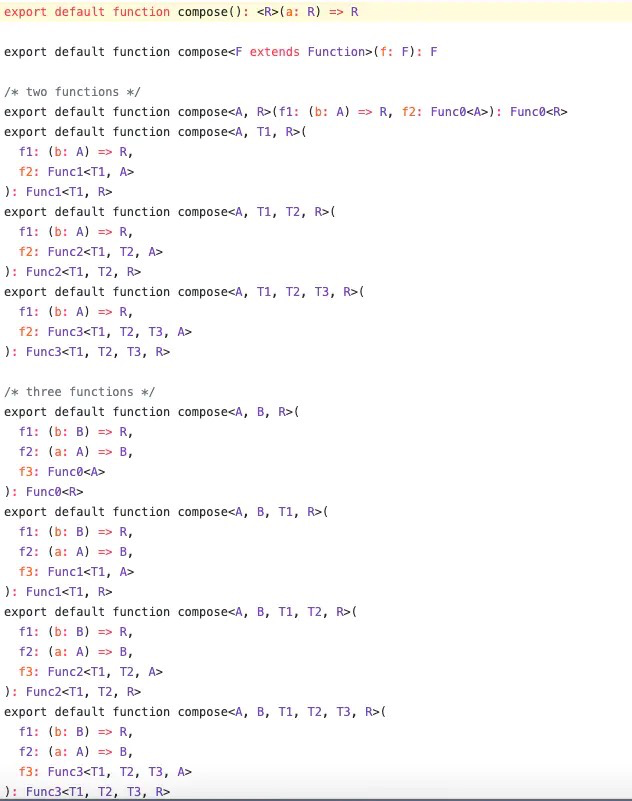
Redux 的compose就是运用大量函数重载的典型案例
声明文件
// shims-vue.d.ts
import Vue from "vue";
import { AxiosInstance } from "axios";
declare module "vue/types/vue" {
    interface Vue {
        $axios: AxiosInstance;
    }
}
Class
// 03-class.ts
class Parent {
	private _foo = "foo"; // 私有属性,不能在类的外部访问
	protected bar = "bar"; // 保护属性,可以在子类中访问
	// 参数属性:构造函数参数加修饰符,能够定义为成员属性
	constructor(public tua = "tua") {}
	// 方法也有修饰符
	private someMethod() {}
	// 存取器:属性方式访问,可添加额外逻辑,控制读写性
	get foo() {
		return this._foo;
	}
	set foo(val) {
		this._foo = val;
	}
}
枚举类型
数字枚举
当我们声明一个枚举类型是,虽然没有给它们赋值,但是它们的值其实是默认的数字类型,而且默认从 0 开始依次累加:
enum Direction {
    Up = 10,
    Down,
    Left,
    Right
}

console.log(Direction.Up, Direction.Down, Direction.Left, Direction.Right); // 10 11 12 13
异构 | 字符串枚举
enum BooleanLikeHeterogeneousEnum {
    No = 0,
    Yes = "YES",
}
接口(interface)
interface User {
    name?: string // 可选属性
    age: number  // 必填属性
    readonly isMale: boolean  // 只读属性
    say: (words: string) => string  // 函数类型
    [propName: string]: ;  // 字符串索引
}
继承
// 可同时继承多个接口
interface VIPUser extends User, SupperUser {
	broadcast: () => void;
}
与 type 异同
与 interface 相比,type 的特点如下:
- 表达功能更强大,不局限于 object/class/function
- 要扩展已有 type 需要创建新 type,不可以重名
- 支持更复杂的类型操作
基本上所有用 interface 表达的类型都有其等价的 type 表达。
除了对外抛出的接口定义约束用的 interface,内部的类型都尽量用的 type。
《TypeScript 中高级应用与最佳实践》
泛型
使用时机:
当你的函数,接口或者类:
- 需要作用到很多类型的时候,
- 需要被用到很多地方的时候,
泛型使用
可以作为一个动态参数传入,使类型使用更加灵活
interface Result<T> {
	ok: 0 | 1;
	data: T[];
}

function getResult<T>(data: T): Result<T> {
	return { ok: 1, data: [data] };
}

getResult<string>("1");
keyof
keyof 操作符可以用来一个对象中的所有 key 值:
interface Person {
	name: string;
	age: number;
}

type K1 = keyof Person; // "name" | "age"
type K2 = keyof Person[]; // "length" | "toString" | "pop" | "push" | "concat" | "join"
type K3 = keyof { [x: string]: Person }; // string | number
in
in 用来遍历枚举类型:
type Keys = "a" | "b" | "c"

type Obj =  {
  [p in Keys]: any
} // -> { a: any, b: any, c: any }
TS 泛型工具 (目前 16 种)
功能是将类型的属性**「变成可选」**。
type Partial<T> = { [P in keyof T]?: T[P] };功能是将类型的属性**「变成只读」**, 在属性前面增加 readonly 意思会将其变成只读。
type Readonly<T> = { readonly [P in keyof T]: T[P] };功能是用来得到一个函数的返回值类型。
type ReturnType<T extends (...args: any[]) => any> = T extends (
	...args: any[]
) => infer R
	? R
: any;功能和Partial 相反,是将类型的属性**「变成必填」**, 这里的 -指的是去除。 -?意思就是去除可选,也就是必填啦。
type Required<T> = { [P in keyof T]-?: T[P] };设计工具类型
diff
Diff<T, U>,我们要找出 T 类型中 U 不包含的部分:
type R = Diff<"a" | "b" | "c" | "d", "a" | "c" | "f">; // "b" | "d"
type Diff<T, U> = T extends U ? never : T;
Part
现在需要编写一个工具类型将 interface 中函数类型的名称取出来,
interface Part {
	id: number;
	name: string;
	subparts: Part[];
	updatePart(newName: string): void;
}

type R = FunctionPropertyNames<Part>; // "updatePart"
TypeScript 装饰器
装饰器是什么
- 它是一个表达式
- 该表达式被执行后,返回一个函数
- 函数的入参分别为 target、name 和 descriptor
- 执行该函数后,可能返回 descriptor 对象,用于配置 target 对象
装饰器的分类
- 类装饰器(Class decorators)
- 属性装饰器(Property decorators)
- 方法装饰器(Method decorators)
- 参数装饰器(Parameter decorators)
tsconfig.json:
{
  "compilerOptions": {
     "target": "ES5",
     "experimentalDecorators": true
   }
}
装饰器使用
类装饰器
function Greeter(greeting: string) {
	return function (target: Function) {
		target.prototype.greet = function (): void {
			console.log(greeting);
		};
	};
}

@Greeter("Hello TS!")
class Greeting {
	constructor() {
		// 内部实现
	}
}

let myGreeting = new Greeting();
myGreeting.greet(); // console output: 'Hello TS!';
方法装饰器
它接收三个参数:
- target: Object - 被装饰的类
- propertyKey: string | symbol - 方法名
- descriptor: TypePropertyDescript - 属性描述符
React 中的运用
对于 input 组件 onChange 中的事件,我们一般是这样声明的:
private updateValue(e: React.ChangeEvent<HTMLInputElement>) {
    this.setState({ itemText: e.target.value })
}
// form表单 React.FormEvent<HTMLFormElement>
compilerOptions 选项
{
  "compilerOptions": {

    /* 基本选项 */
    "target": "es5",                       // 指定 ECMAScript 目标版本: 'ES3' (default), 'ES5', 'ES6'/'ES2015', 'ES2016', 'ES2017', or 'ESNEXT'
    "module": "commonjs",                  // 指定使用模块: 'commonjs', 'amd', 'system', 'umd' or 'es2015'
    "lib": [],                             // 指定要包含在编译中的库文件
    "allowJs": true,                       // 允许编译 javascript 文件
    "checkJs": true,                       // 报告 javascript 文件中的错误
    "jsx": "preserve",                     // 指定 jsx 代码的生成: 'preserve', 'react-native', or 'react'
    "declaration": true,                   // 生成相应的 '.d.ts' 文件
    "sourceMap": true,                     // 生成相应的 '.map' 文件
    "outFile": "./",                       // 将输出文件合并为一个文件
    "outDir": "./",                        // 指定输出目录
    "rootDir": "./",                       // 用来控制输出目录结构 --outDir.
    "removeComments": true,                // 删除编译后的所有的注释
    "noEmit": true,                        // 不生成输出文件
    "importHelpers": true,                 // 从 tslib 导入辅助工具函数
    "isolatedModules": true,               // 将每个文件做为单独的模块 (与 'ts.transpileModule' 类似).

    /* 严格的类型检查选项 */
    "strict": true,                        // 启用所有严格类型检查选项
    "noImplicitAny": true,                 // 在表达式和声明上有隐含的 any类型时报错
    "strictNullChecks": true,              // 启用严格的 null 检查
    "noImplicitThis": true,                // 当 this 表达式值为 any 类型的时候,生成一个错误
    "alwaysStrict": true,                  // 以严格模式检查每个模块,并在每个文件里加入 'use strict'

    /* 额外的检查 */
    "noUnusedLocals": true,                // 有未使用的变量时,抛出错误
    "noUnusedParameters": true,            // 有未使用的参数时,抛出错误
    "noImplicitReturns": true,             // 并不是所有函数里的代码都有返回值时,抛出错误
    "noFallthroughCasesInSwitch": true,    // 报告 switch 语句的 fallthrough 错误。(即,不允许 switch 的 case 语句贯穿)

    /* 模块解析选项 */
    "moduleResolution": "node",            // 选择模块解析策略: 'node' (Node.js) or 'classic' (TypeScript pre-1.6)
    "baseUrl": "./",                       // 用于解析非相对模块名称的基目录
    "paths": {},                           // 模块名到基于 baseUrl 的路径映射的列表
    "rootDirs": [],                        // 根文件夹列表,其组合内容表示项目运行时的结构内容
    "typeRoots": [],                       // 包含类型声明的文件列表
    "types": [],                           // 需要包含的类型声明文件名列表
    "allowSyntheticDefaultImports": true,  // 允许从没有设置默认导出的模块中默认导入。

    /* Source Map Options */
    "sourceRoot": "./",                    // 指定调试器应该找到 TypeScript 文件而不是源文件的位置
    "mapRoot": "./",                       // 指定调试器应该找到映射文件而不是生成文件的位置
    "inlineSourceMap": true,               // 生成单个 soucemaps 文件,而不是将 sourcemaps 生成不同的文件
    "inlineSources": true,                 // 将代码与 sourcemaps 生成到一个文件中,要求同时设置了 --inlineSourceMap 或 --sourceMap 属性

    /* 其他选项 */
    "experimentalDecorators": true,        // 启用装饰器
    "emitDecoratorMetadata": true          // 为装饰器提供元数据的支持
  }
}
我为什么不用 TypeScript
因为它需要显式的编译步骤,还因为它用类型体操污染了代码,这给我的开发体验增添了很少的乐趣,而且常常带来相当大的悲伤。应该容易的事情变得困难,困难的事情变得“任何”。
TypeScript 学习资源
https://mp.weixin.qq.com/s/BJaJLZRfRn4dLzh4-zNWSg
【全文 8W 字】我是怎样从 0 开始学会 🚀TypeScript🚀 的 - 掘金